Introduction
Modern creators work in increasingly complex digital environments. Whether editing videos, designing graphics, retouching photos, or producing animation projects, professionals often rely on dozens of keyboard shortcuts every minute. Constantly switching between a mouse, keyboard, and software panels can interrupt workflow efficiency and slow down creative production. This is exactly why editing consoles have become more popular among creators looking for faster and more intuitive control methods.
Among the leading options in today’s market are TourBox and XPPen Pilot Pro. Both devices are designed as creative editing consoles that help users streamline shortcut-heavy workflows and improve productivity across creative applications. Instead of depending entirely on keyboard commands, creators can use physical dials, buttons, and wheels to control editing functions more naturally.
Although both products target creative professionals, they offer different experiences. TourBox focuses heavily on tactile feedback and advanced customization, while XPPen Pilot Pro emphasizes smooth workflow integration, accessibility, and editing efficiency for modern creators. In this comparison, we will explore their differences in design, controls, editing workflow, software compatibility, customization options, pricing, and overall value to help you decide which editing console is best for your workflow.
TourBox vs XPPen Pilot Pro at a Glance
Before exploring the detailed comparison, here is a quick overview of the key differences between TourBox and XPPen Pilot Pro.
| Feature | TourBox | XPPen Pilot Pro Editing Console |
| Product Type | Creative editing console | Professional editing console |
| Main Controls | Buttons, knobs, dials | Wheel, dial, shortcut controls |
| Design Style | Compact and control-heavy | Modern and streamlined |
| Learning Curve | Moderate to advanced | Beginner-friendly |
| Software Support | Wide creative app support | Mainstream editing software |
| Portability | Very portable | Portable and ergonomic |
| Best For | Advanced creators | Video editors and content creators |
| Value | Premium-level controller | Strong price-performance balance |
Design and Layout
TourBox Design and User Experience
TourBox is designed with a highly compact structure that packs multiple controls into a small device. It includes knobs, buttons, dials, scroll wheels, and side triggers arranged closely together to maximize functionality while minimizing hand movement.
The main advantage of this design is efficiency. Editors and designers can quickly access shortcuts without moving their hands across a keyboard. The tactile feel of the controls also creates a satisfying editing experience, especially during long production sessions.
Because the controls are densely arranged, TourBox offers a large number of programmable actions despite its compact size. Professional users often appreciate this flexibility because it allows them to build highly customized workflows for editing, retouching, or animation work.
However, the dense layout can initially feel overwhelming for beginners. Memorizing button combinations and building muscle memory takes time. New users may need several days or even weeks to fully adapt to the controller.
XPPen Pilot Pro Design and User Experience
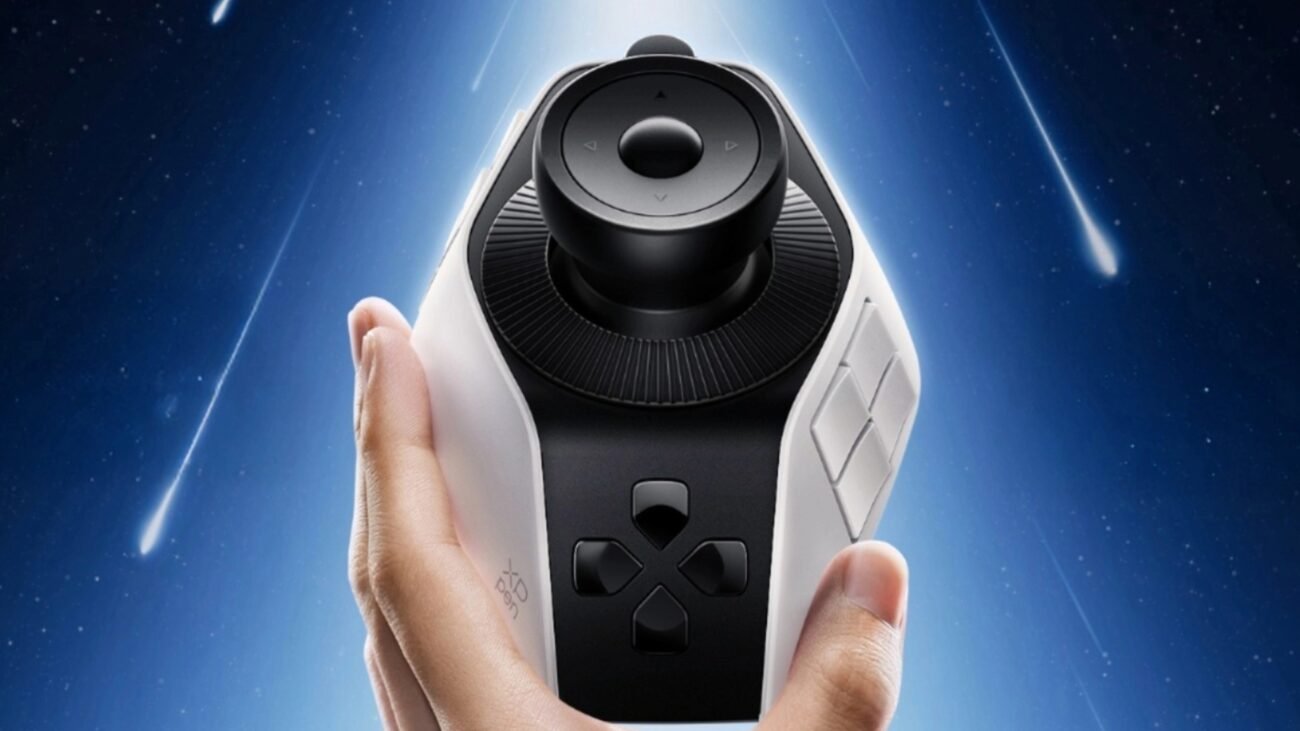
XPPen Pilot Pro takes a different approach by focusing on accessibility and workflow comfort. Instead of concentrating as many controls as possible into a small space, it balances functionality with a cleaner and more intuitive layout.
The design feels modern, organized, and beginner-friendly. Shortcut controls are positioned logically, making it easier for users to transition from keyboard-based editing to console-based workflows.
One of the strongest aspects of the XPPen Pilot Pro design is ergonomics. The device is comfortable to use during extended editing sessions, reducing hand strain caused by repetitive keyboard movements.
The streamlined layout also helps users learn the device more quickly. Creators who are new to editing consoles can adapt faster because the controls feel less intimidating compared with highly dense control systems.
Controls and Editing Workflow
TourBox Workflow Performance
TourBox is designed for creators who want complete control over shortcut management. Users can assign editing functions, macros, and commands to nearly every button and dial on the device.
For example:
· One dial can handle timeline scrubbing
· Another knob can adjust zoom levels
· Side buttons can switch editing tools
· Combination commands can trigger complex macros
This customization depth makes TourBox especially powerful for advanced editors, illustrators, and photographers who work with multiple tools and software platforms.
The tactile control system can significantly improve workflow speed once users become familiar with the setup. Many professionals appreciate the ability to reduce repetitive keyboard actions during long editing sessions.
However, beginners may initially find the workflow setup process complicated. The device performs best when users invest time in creating optimized profiles for different applications.
XPPen Pilot Pro Workflow Performance
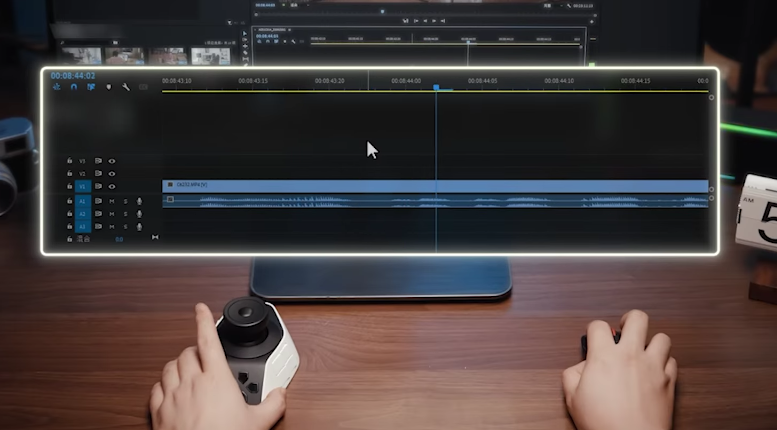
XPPen Pilot Pro focuses on smooth and intuitive editing workflows rather than extreme shortcut complexity. The controls are designed around practical editing habits, making it easier for users to improve productivity immediately.
The device performs particularly well in:
· Timeline navigation
· Video trimming
· Playback control
· Zoom adjustments
· Brush control
· Effect parameter tuning
For video editors and content creators, the workflow feels natural and easy to understand. Instead of spending hours configuring complicated macros, users can begin improving their editing speed quickly.
Another important advantage is comfort. XPPen Pilot Pro helps reduce repetitive keyboard usage while maintaining a smooth editing rhythm during long projects.
For creators working on YouTube videos, social media content, commercial projects, or short films, this streamlined workflow can significantly improve productivity.
Customization and Software Support
TourBox Customization Features
Customization is one of TourBox’s strongest features. Users can:
· Create application-specific profiles
· Configure button combinations
· Assign macros
· Customize dial sensitivity
· Switch between multiple editing modes
This flexibility is highly valuable for professionals with complex workflows.
TourBox supports a wide range of creative software, including:
· Adobe Premiere Pro
· Photoshop
· Lightroom
· DaVinci Resolve
· Final Cut Pro
· After Effects
· Clip Studio Paint
Because of its advanced customization system, TourBox is especially popular among professional editors, photographers, and digital artists.
The downside is that the setup process may feel technical for beginners.
XPPen Pilot Pro Customization Features
XPPen Pilot Pro also supports customizable workflows while maintaining a more accessible user experience. Users can personalize shortcut mappings and optimize controls for different software applications without needing extensive technical setup.
Supported software includes:
· Adobe Premiere Pro
· Photoshop
· Illustrator
· DaVinci Resolve
· After Effects
· Other popular creative tools
One major advantage is simplicity. Users can configure the device quickly and begin working efficiently without spending excessive time learning complicated macro systems.
This balance between customization and usability makes XPPen Pilot Pro especially attractive for modern content creators who want productivity improvements without unnecessary complexity.
Video Editing and Creative Performance
TourBox for Professional Editing
TourBox performs exceptionally well in professional editing environments where creators rely heavily on shortcut efficiency and customized workflows.
It works especially well for:
· Multi-track video editing
· Motion graphics
· Audio adjustments
· Advanced timeline management
· Photo retouching
· Digital illustration
Professional users who invest time into building optimized control profiles can achieve significant workflow improvements.
However, newer users may require patience before reaching maximum efficiency.
XPPen Pilot Pro for Content Creators
XPPen Pilot Pro is particularly strong for modern video creators because it balances professional functionality with ease of use.
Its workflow advantages include:
· Faster timeline navigation
· Comfortable editing control
· Efficient parameter adjustments
· Reduced keyboard dependence
· Smooth long-session usability
The device is highly suitable for:
· YouTubers
· Freelance editors
· Social media creators
· Beginner editors
· Creative professionals
For creators who prioritize practical workflow improvement and accessibility, XPPen Pilot Pro offers a highly efficient editing experience.
Which Is Better for Color Grading?
TourBox for Color Grading
TourBox’s multiple dials and customizable controls make it highly capable for color grading workflows. Users can map controls to:
· Exposure
· Contrast
· Shadows
· Highlights
· Saturation
· White balance adjustments
Advanced users working in DaVinci Resolve may appreciate the high degree of precision and customization available.
However, configuring these workflows requires time and technical familiarity.
XPPen Pilot Pro for Color Grading
XPPen Pilot Pro also performs well for color grading, particularly for editors who want smoother and simpler workflows.
The controls allow creators to make grading adjustments naturally without needing overly complicated configurations. For many users, this creates a more enjoyable editing experience while still maintaining professional efficiency.
It is especially suitable for beginner and intermediate colorists who want reliable workflow improvements without steep learning curves.
FAQs
Q1: Is TourBox better than XPPen Pilot Pro?
TourBox is better for users who prioritize deep customization and advanced shortcut control. XPPen Pilot Pro is better for creators who prefer intuitive workflows, accessibility, and smoother learning experiences.
Q2: Is XPPen Pilot Pro good for video editing?
Yes. XPPen Pilot Pro is highly suitable for video editing because it improves timeline control, shortcut efficiency, and editing comfort while remaining easy to learn.
Q3: Which is better for color grading?
TourBox offers more advanced customization for experienced colorists, while XPPen Pilot Pro provides a smoother and more beginner-friendly grading workflow.
Q4: Are editing consoles worth it for beginners?
Yes. Editing consoles can help beginners improve workflow efficiency, reduce repetitive keyboard use, and make creative work more comfortable and intuitive.
Q5: Do these editing consoles replace a keyboard?
No. Editing consoles are designed to complement keyboards rather than completely replace them. They improve shortcut-heavy tasks while keyboards remain important for typing and additional commands.
Conclusion
Both TourBox and XPPen Pilot Pro are powerful editing consoles that can significantly improve creative workflows, but they target different types of users.
TourBox stands out for its advanced customization system, dense tactile controls, and professional-level flexibility. It is ideal for experienced creators who enjoy building highly personalized workflows and maximizing shortcut efficiency.
XPPen Pilot Pro focuses more on accessibility, comfort, and practical editing efficiency. Its modern design, intuitive controls, and streamlined workflow make it an excellent option for video editors, YouTubers, content creators, and beginners entering professional creative workflows.
Ultimately, the best editing console depends on your workflow style, experience level, and editing priorities. If you prefer deep customization and advanced control mapping, TourBox may be the better choice. But if you want a professional editing console that combines usability, workflow speed, comfort, and strong overall value, XPPen Pilot Pro is a highly compelling solution for modern creators.
