Every Gimkit code is like a golden ticket to a fun, game-based classroom quiz. Whether you’re a student eager to jump into a live game or a teacher setting up a lesson, this unique alphanumeric code makes it all happen. Think of it as a VIP pass – your teacher creates a game, Gimkit spits out a short 5-6 character code, and you use that to log in. It’s quick, secure, and requires no extra sign-up for players. This guide covers everything about Gimkit codes: what they are, how they work, different code types, steps to join games, ways to find active codes, and tips to avoid hiccups.
| Aspect | Details |
|---|---|
| Code Format | Alphanumeric (letters + numbers), usually 5–6 characters |
| Purpose | Secret join key for live games and assignments |
| Expire After | Game session ends (codes are session-specific) |
| Access | Enter at gimkit.com/join or scan teacher’s QR code |
| Typical Use | Live classroom quiz, homework assignment, or creative challenge |
What Is a Gimkit Code?
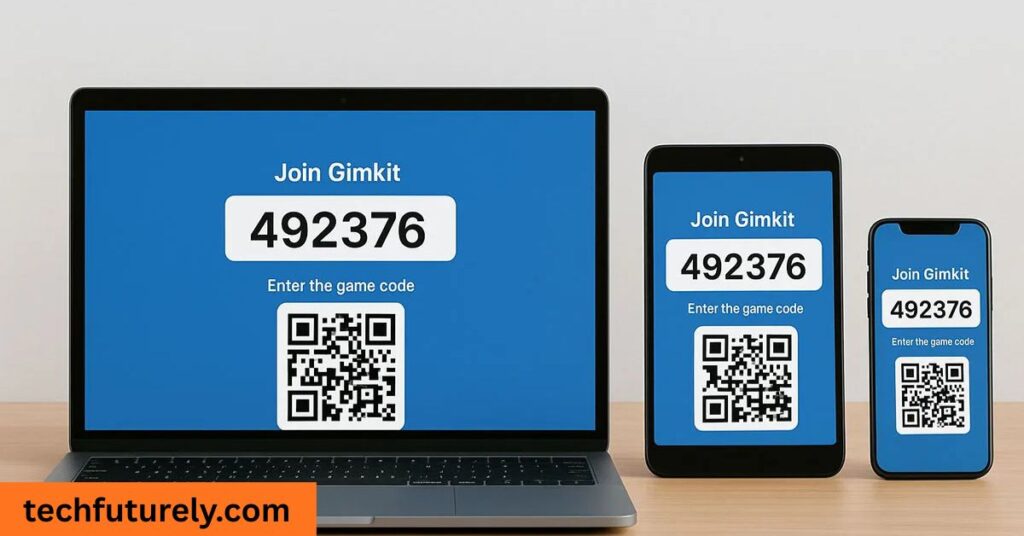
A Gimkit code is essentially the key that opens the door to your teacher’s quiz game. When an instructor hits “Start Game” on a kit of questions, Gimkit automatically generates a unique code tied to that exact session. Students then simply enter this code on the join page (gimkit.com/join) to teleport right into the game lobby. It’s a bit like a digital handshake: the code confirms you’re in the right place at the right time. As one guide puts it, “Gimkit code is the key that connects students and teachers inside a live learning game environment”.
Think of it as your VIP ticket to an interactive game show. No fuss, no email invites – just your teacher’s short code. This system ensures only invited players enter, keeping classrooms organized and private. For example, if you type the wrong character even once, Gimkit won’t let you in, because each code is specific and case-sensitive. This precision prevents random people from hopping into your math quiz! The code simplifies everything: you avoid manual sign-ups and time-consuming links, and your teacher controls who joins and when.
- Unique & Temporary: Each code is unique to its session and usually valid only while the game is live.
- No Account Needed: You don’t need a Gimkit account as a student. Just get the code, type a nickname, and you’re in.
- Secure: Think of it like a concert ticket – once the show ends, the ticket (code) can’t be reused. This keeps each game secure and chaos-free.
In short, a Gimkit code is the secret handshake that lets students into an educator’s game, making interactive learning as easy as pie.
Types of Gimkit Codes
Not all Gimkit codes are the same. There are a few varieties you might encounter:
| Code Type | Description |
|---|---|
| Live Game Code | Temporary code for real-time games (classic quiz modes). It expires after that session. |
| Creative Code | Lasts longer for user-created quizzes. Teachers share these codes or links to allow others to play their custom kits. |
| Assignment Code | Used for take-home or homework mode. Students log in through their accounts instead of using a join code. |
- Live Game Codes: These are the most common. When your teacher hosts a quiz game, Gimkit generates a short code (typically 5 or 6 characters long). Everyone uses that code to join on the spot. Once the game ends, the code expires, so you’ll need a new one for the next session.
- Creative Codes: If someone builds a quiz in Gimkit’s Creative Mode, they might share a code or link to let others play at any time. These codes can be longer (8–10+ characters) and stay active longer than live game codes.
- Assignment Codes: For homework-style activities, teachers use special assignment codes. Students simply log in to Gimkit and enter the assignment code to access the quiz outside of class hours.
Understanding these code types helps. Whether it’s an in-class Live Game or an at-home Assignment, each Gimkit code connects you to the right session. Importantly, all codes are alphanumeric (mix of letters and numbers), so get comfortable with a quick stream of characters. As the creators note, “The platform automatically displays the code on the screen” when a game starts – and you just enter it to join.
How to Join a Gimkit Game with a Code
Joining a game is super straightforward. Just follow these steps:
| Step | What to Do |
|---|---|
| 1. Open Join Page | Go to gimkit.com/join in your web browser. |
| 2. Enter Code | Type the Gimkit code your teacher shows on screen. |
| 3. Provide Name | Enter a nickname (or your real name, if required) for the game. |
| 4. Join Lobby | You’ll enter the game lobby and wait for the host to start the game. |
Open the Join Page. In any browser, navigate to gimkit.com/join. The official guide advises, “Go to gimkit.com/join” as the first step.
Type in the Code. Carefully enter the code exactly as given (watch out for confusing characters like O vs 0, l vs 1). The teacher will usually display it on a screen or share it in chat. Once entered, press Enter or click “Join.”
Enter Your Name. Most games ask for a nickname or name. This is how you’ll appear on the leaderboard. Teachers can enable a nickname generator or require real names – just follow the prompt.
You’re In! After these steps, you’re in the game lobby. Wait there until the teacher starts the quiz.
If your teacher is tech-savvy, they might also use a QR code to speed things up. Gimkit lets hosts display a QR code for the session. Just scan it with your phone’s camera to jump in, no typing needed. This is a lifesaver if the code has tricky characters or if you’re on mobile. But even without QR, the four steps above get you in place.
Key point: No Gimkit account is required to join. You don’t need to register or log in – the code and a nickname are all that’s needed. This simplicity is one reason students love Gimkit. You basically hit the web link, punch in the code your teacher gave you, and bam – learning game time.
How to Get a Gimkit Code
You know what a Gimkit code does; now, where do you find one? Here are reliable ways to grab an active code:
Ask Your Teacher or Host
This is the gold standard. The person running the game will obviously have the code. Don’t be shy – if you think there’s a class quiz or review game happening, politely ask, “What’s the Gimkit code?” Many teachers post the code on a board or classroom chat. If it’s homework mode, they’ll email or post it in your class portal. Essentially, the teacher is the source.
Check Class Announcements
Some teachers share the code in advance. Look through your class’s Canvas, Google Classroom, Slack channel or email. The outrigth blog reminds us to “check emails or classroom announcements” because teachers often circulate codes that way. You might also see them pinned on a class website or assignment page.
Join Gimkit Communities
There are public student/teacher communities online where codes get shared (especially creative or practice games). For example, the r/Gimkit subreddit and the official Gimkit Discord server (tens of thousands of members) often have channels for “public games” or “code-sharing”. Users there drop codes from ongoing games. Caution: Always follow community rules and avoid spamming. Only use codes that are posted for public access.
Social Media and Video Streams
Many educators or content creators host live Gimkit games on platforms like TikTok, Instagram Live, or YouTube. Look for hashtags like #GimkitLive or #GimkitCode, or follow popular gaming/education influencers. They’ll display the code during the stream or write it in the description. If someone on TikTok says “Play with me on Gimkit!” you can hop in by entering the code they show. This can be a fun way to join games beyond your classroom.
School Clubs and Events
Sometimes school clubs, after-school programs or workshops host open Gimkit games as activities. Keep an eye on your school’s event calendar or announcements: “Gimkit Night, join code in bio” might pop up. These community events are a way to meet peers and play games together.
Peer Networks
Buddy up with classmates! If a friend is already in a Gimkit game, they can share the code in your group chat. Form study groups (Discord, WhatsApp, Snapchat) where you post active codes when they arise. Just remember: always get codes from trusted sources (your teacher or friends), not random strangers.
Avoid Code Generator Sites
You might be tempted to “generate” codes or find active codes on sketchy websites. Don’t. These sites are often scams and can be dangerous. As one guide warns, be cautious about any site promising free Gimkit codes – real codes only come from actual games.
In summary, the best way to get a valid Gimkit code is straight from the classroom ecosystem: your teacher, classmates, or official online channels. It’s like knowing the secret handshake in a club – only insiders get to use it.
Tips and Best Practices
Using Gimkit codes is usually smooth, but here are some insider tips to make sure nothing trips you up:
Type Carefully
One common hiccup is mixing up similar characters. For example, uppercase “O” and zero “0” or lowercase “l” and number “1” look alike. Always double-check the code before hitting enter. Remember, these codes are case-sensitive, so “G1M7K” is different from “g1m7k” or “G1MIk” with an I.
Join Promptly
Don’t wait too long after a code is announced, especially for fast-paced games. If everyone logs in quickly, you won’t miss any questions. Some hosts use a countdown to start, so have your browser ready on gimkit.com/join when the code is shared.
Use QR Codes if Available
If the teacher gives a QR code, use it! Scanning the code with your phone’s camera automatically takes you to the game, bypassing typing entirely. This is especially helpful on mobile devices or if you have a complicated code.
Check the Game Mode
After joining, note if the game is “Live Game” or “Assignment”. In a live game, you’ll wait in a lobby for the teacher to start. In an assignment (homework), you might jump right into questions. The code may look similar, but the experience differs. Your teacher will usually clarify which mode is active.
Avoid Distractions
Make sure you’re online, sound on (sometimes there’s audio), and focused when joining. A wobbly internet connection can lead to trouble entering the code (the official support suggests refreshing the page if issues arise).
Don’t Reuse Codes
Remember that every code expires after one game. Trying an old code from a previous class will result in an error. If you’re planning a review, ask for the new code each time.
Respect Privacy
Codes are meant for intended participants. Don’t share class codes on public forums unless your teacher says it’s okay. This keeps games private and relevant to your group.
By following these practices, you’ll have fewer mix-ups. In fact, many of the typical problems in Gimkit games come down to simple input mistakes. Keep it tidy and quick, and you’ll breeze through the joining process every time.
Conclusion
A Gimkit code might look like a random string of characters, but it’s actually a powerful tool for classroom engagement. It brings students into a lively quiz environment in seconds, without the hassle of accounts or invitations. By understanding how these codes work, you can join games smoothly, help friends find the right code, and even host games with ease. Remember: codes are session-specific and expire after each game, so treat each code like a one-time pass.
Whether it’s a fun review with classmates or a competitive quiz at home, the Gimkit code is your gateway. Use the tips above, share the excitement with friends, and enjoy the interactive learning experience. Now, get that code from your teacher and let the learning games begin!
FAQs
How long is a Gimkit code?
It’s usually 5 or 6 characters (mix of letters and numbers) for live games. (Creative mode codes can be longer, but that’s less common for quick quizzes.)
When does the code expire?
The code automatically expires as soon as the host ends the game. Think of it like a one-time entry ticket.
Do I need an account to join?
Nope! You can join a live game without signing up. All you need is the game code and a nickname.
Can two classes use the same code?
No. Each code is unique to a session. If your teacher starts another game (even with the same lesson), a new code is generated.
What if I enter the wrong code?
You’ll get an “invalid code” error. Double-check with the teacher or host. Mistypes are the usual culprit.
What’s the best way to get a code?
Ask the teacher directly. That’s the fastest way to ensure the code is correct and up-to-date.
Can I search for Gimkit codes online?
Technically no, you shouldn’t. Gimkit codes aren’t posted publicly by the company. Finding random codes is nearly impossible and usually a bad idea. Focus on codes shared with you through class channels or friends.
